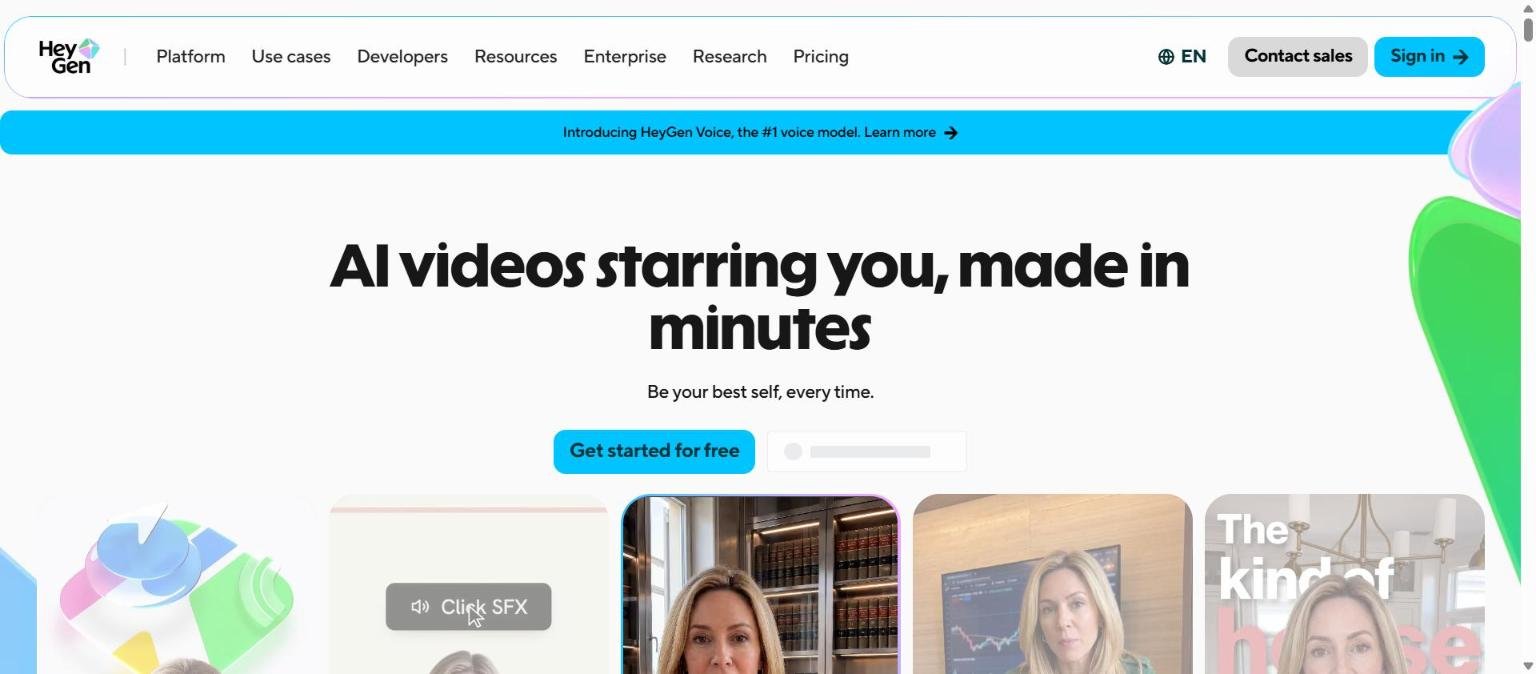
HeyGen is an AI video platform built around avatars, synthetic voices and translation. Its homepage pitches a personal avatar made from your own face and voice, so that you do not have to film every video, and the headline reads “Be your best self, every time.” The product has since grown into a wider set of tools that includes a script-based studio, video translation and dubbing, a prompt-to-video agent and a developer API.
This guide sets out what HeyGen’s own pages say about its products, plans, credits, security claims and privacy policy, and how it sits next to other video tools on our list. We also have our shorter HeyGen review and a side-by-side piece on HeyGen versus Synthesia. Many claims on the vendor’s pages are marketing claims, and we mark them as such.
How we researched this: we did not run hands-on tests for this article. It is based on the vendor’s own documentation and public sources, checked on 14 November 2026. Features and prices change, so confirm details on the vendor’s site before you buy.
Key takeaways
- HeyGen makes AI avatar video, voice, translation and dubbing tools, plus a prompt-to-video agent and an API for developers.
- The pricing page we read on 14 November 2026 lists Free, Creator, Pro, Business and Enterprise plans, with Creator shown at $29 a month on monthly billing.
- Plans are credit based, and the separate API uses pay-as-you-go credits with per-minute rates that differ by avatar engine.
- HeyGen’s privacy policy says it may use your input to train and improve its models, and that you can ask to opt out. Enterprise data is governed by contract.
- Many headline numbers, such as 30 million users and a 4.8 out of 5 rating from over 1,000 reviews, are vendor claims we have not verified.
What it is and who makes it
HeyGen is an AI video company whose product lets you create videos presented by AI avatars with synthetic voices, and translate existing videos into other languages. The homepage lists these product areas: avatars (including Avatar V, Avatar IV and talking photos), voice (HeyGen Voice and voice cloning), translation and dubbing with lip sync, an AI Studio editor, text to video, image to video, audio to video, PPT and PDF to video, and an API.
What the vendor says about itself
The homepage makes several claims about scale and reputation. It says HeyGen is trusted by over 1,000,000 developers and leading companies, that it has more than 30 million users and customers in 196 countries, and that it is used across 85 percent of the Fortune 100. It also calls itself a Forbes AI 50 company, cites a G2 label for most realistic avatars, and shows a 4.8 out of 5 rating from more than 1,000 reviews. These are the vendor’s statements. We did not verify any of them, and we do not offer a rating of our own.
Languages
The homepage and the pricing page both refer to 175 or more languages and dialects. The Free plan is described as including 30 or more languages, so the full range appears tied to paid plans.
Who it is for
From the documented products, HeyGen is aimed at the following groups.
- Marketers and small businesses who want presenter-style videos without filming, using a personal avatar or a stock presenter.
- Training and learning teams, since the Business plan lists SCORM export and LMS integrations.
- Global teams who need translation and dubbing, with voice cloning and lip sync, into many languages.
- Developers who want video generation, translation or lip sync through an API.
- Enterprises who need SAML single sign-on, SCIM provisioning, MFA and custom commercial terms, all listed on higher tiers.
It is a weaker fit for people who need a full creative video editor for cinematic footage, where a tool such as Runway is aimed at generation and editing of scenes. It may also be a poor fit if you cannot accept that your face and voice data is processed, which we cover in the privacy section. Our guide to choosing an AI tool helps you decide which category you need first.
Core features
Personal and stock avatars
HeyGen’s main idea is a Personal Avatar built from your own face and voice. The pricing page lists a Custom Video Avatar on every plan, including Free, and says the Free plan includes more than 500 ready-made presenters. Higher plans add more custom avatars, with the Business plan listing five Custom Video Avatars with Avatar V. The homepage says custom avatars require on-camera identity verification from the person depicted.
Avatar generations
The pages mention Avatar III, Avatar IV and Avatar V, with Avatar V described as the latest model in an April 2026 update. The pricing page says the Creator plan includes Avatar III and IV and limited use of Avatar V, while Pro adds first access to new models. We could not confirm technical differences between the generations from the pages we read.
Video translation and dubbing
Video Translation and AI Dubbing are listed with voice cloning and lip sync. The help centre rates, covered under pricing below, show a Speed mode and a Precision mode for API translation, with lip sync available on both. The Pro plan lists editing of translation scripts.
AI Studio
The homepage describes AI Studio as a script-based editor with Voice Director, Voice Mirroring and Gesture Control. We did not open these features, so we do not describe how they behave.
Text, image, audio and slide inputs
The homepage lists text to video, image to video, audio to video, PPT and PDF to video, and lip sync. That gives several ways to start a video, from a script to an existing slide deck.
Newer or advanced features and integrations
Video Agent
The homepage says Video Agent turns a prompt into a video and that the output stays editable. The pricing page lists Video Agent access even on the Free plan, and the help centre lists a Video Agent rate for API use at 116 credits a minute.
HeyGen Voice
The homepage banner introduces HeyGen Voice and calls it the number one voice model. That is a vendor claim, and we did not find an independent benchmark. The Creator plan lists up to 10 hours of text to speech and Pro lists more than 16 hours. For related voice tools, see our coverage of AI voice tools this year.
Developer API and HyperFrames
HeyGen for Developers, dated April 2026 on the homepage, covers Video Agent, Video Generation, Translation and Lipsync APIs. HyperFrames, dated 28 April 2026 on the same page, is described as an open-source rendering framework that lets AI agents build videos from HTML, CSS and JavaScript. A HeyGen plugin for ChatGPT is also listed.
Workflow integrations
The Business plan lists integrations with n8n, Make, HubSpot and Zapier, alongside SCORM export and LMS integrations. The Pro plan lists access to third-party models, including Seedance, Veo and Nano Banana, which the page names without further detail.
Pricing and plans
The table below reflects HeyGen’s pricing page as read on 14 November 2026. The page uses a dollar sign without naming a currency, and it offers yearly billing with a note about two months free. Confirm everything on the live page, because plans and credits change.
| Plan | Price shown | Credits | Longest video | Resolution |
|---|---|---|---|---|
| Free | $0 a month | Not stated on the page | 1 minute | Not stated |
| Creator | $29 a month, or $24 a month billed annually per the page FAQ | 600 | 30 minutes | Up to 1080p |
| Pro | From $49 a month, with higher tiers up to 100,000 credits at $4,300 a month | 1,000 at the base tier | 30 minutes | Up to 4K |
| Business | $149 a month plus $20 per seat a month per the page FAQ | 1,500 | 60 minutes | Up to 4K |
| Enterprise | Contact sales | Set to your usage | No maximum | Up to 4K |
What each plan adds
- Free: up to three watermarked videos a month, Avatar IV and Video Agent access, one custom avatar, 500 or more presenters and 30 or more languages.
- Creator: branding removed, Avatar III and IV, limited Avatar V, a custom avatar with your own voice, 175 or more languages, and credits that roll over for one month.
- Pro: 4K export, third-party model access, cinematic avatars, one professional voice clone at no charge, faster processing and editable translation scripts.
- Business: shared workspace members, central billing with top-ups, SAML SSO, SCORM export, integrations and five custom avatars.
- Enterprise: multi-workspace control, SCIM provisioning, MFA for team members, a dedicated customer success manager, priority support and custom terms.
The page does not clearly state whether each plan permits commercial use, so check the terms before using output in paid work. Our guide to reading an AI tool’s pricing page explains how to compare credit allowances like these.
API credits
HeyGen’s help centre says API credits are pay as you go, separate from the Creator, Pro and Business plans, with no subscription required. It says HeyGen has not offered free API credits since February 2026, and that pay-as-you-go credits expire after 12 months. The figures imply 20 credits per US dollar, which the article does not state directly. Selected rates for videos made through the API are below.
| Item | Rate | Credits |
|---|---|---|
| Avatar V, digital twin | $7.20 a minute | 144 a minute |
| Avatar IV, digital twin or studio avatar | $4.83 a minute | 97 a minute |
| Avatar IV, photo avatar | $2.31 a minute | 46 a minute |
| Avatar III, digital twin | $0.60 a minute | 12 a minute |
| Video Agent, prompt to video | $5.82 a minute | 116 a minute |
| Video translation, speed, audio only | $0.57 a minute | 11 a minute |
| Video translation, precision, lip sync | $1.50 a minute | 30 a minute |
The help centre adds that 4K requests for Avatar IV and V are billed at the 1080p rate, that 10 videos can run at once, and that requests over the limit return an HTTP 429 error. These are API rates and not the rules for the web plans.
Strengths
A clear focus on avatar video
HeyGen’s product list centres on presenter-style video with avatars, voice and translation. If that is your need, you get a dedicated set of tools rather than a general video suite.
Wide language coverage
The vendor lists 175 or more languages and dialects, with translation, voice cloning and lip sync. For teams that publish in many markets, that is a documented breadth, although we have not checked quality.
A real free tier and a transparent rate table
The Free plan includes a watermarked allowance and access to Avatar IV and Video Agent, which lets you look before you pay. The help centre also publishes per-minute API rates openly, which is useful for planning.
Team and enterprise controls
The higher plans list SAML SSO, SCIM, MFA, SCORM export and LMS integrations. These matter to training and IT teams that have procurement checklists.
Developer and automation options
There is an API, an open-source rendering framework and connectors for common automation tools, which gives a route from manual use to workflows.
Weaknesses and limits
Credits and tiers add complexity
Web plans use credits, the API uses a separate credit system, and Pro has many tiers up to 100,000 credits. Working out what a month of video costs takes effort, especially when rates differ by avatar engine and feature.
Free plan limits
The Free plan is limited to a one minute maximum video and three watermarked videos a month, so it is for trying, not for publishing.
Unclear points on the pricing page
The page does not state the Free plan’s credits, the commercial use position for each plan, or the Pro plan’s annual price. The Pro watermark row also appears inconsistent on the page, so confirm it before relying on it.
Your likeness is processed
Personal avatars require face and voice data. The privacy policy says some features process parts of faces or bodies, so you should read the biometric notice and think about consent for anyone shown.
Vendor claims we could not verify
The user numbers, review score, awards and quality claims on the homepage are the vendor’s own. Judge the output quality by testing your own scripts, as in our guide to protecting company data when using AI tools for the data side and the usual trial approach for the quality side.
Privacy, data handling and security
We read HeyGen’s privacy policy, which showed a last updated date of 15 October 2026, and the security claims on its homepage. We did not read the separate biometric notice or the terms of service.
| Topic | What the vendor’s pages say |
|---|---|
| Training on your content | HeyGen may use your input to train and improve its models, including avatar creation models, and you can request to opt out by contacting the company |
| Enterprise data | Enterprise customer data is governed by customer contracts |
| Faces and bodies | Some features process parts of faces or bodies, and the policy refers to a separate biometric notice |
| Deletion | The company says it strives to delete information within 72 hours of a request, with backups kept for 60 days and then erased |
| Identity checks | Custom avatars require on-camera identity verification from the person depicted |
| Compliance badges | The homepage shows GDPR, SOC 2 Type II, CCPA, AI Act and DPF badges, which are vendor claims |
The homepage also mentions annual penetration testing, continuous vulnerability management and moderation that combines machine scanning and trained reviewers. If you handle client footage, staff likenesses or regulated content, ask the vendor for its current reports and read the policy yourself.
How it compares
The table sets HeyGen against three other tools on our list, using what each vendor’s own pages showed on 14 November 2026. We have not tested any of them. Our HeyGen versus Synthesia comparison covers the closest rival in more depth.
| Tool | Homepage positioning | Documented pricing point | Distinctive documented point |
|---|---|---|---|
| HeyGen | Avatar video, voice and translation | Free plan, then paid plans with credits | 175 or more languages, personal avatars, API |
| Synthesia | AI video and avatar platform for business | Pricing page exists, details not captured in this guide | Homepage says no credit card is required to try |
| Runway | Creative tools for video, images and audio | Credit plans from Free to Enterprise | Generative video models and an API |
| Pika | Creative platform for video, image and audio | Pricing page exists, details not captured in this guide | Homepage promotes the Pika H3 Flex model |
Getting started
- Open the HeyGen pricing page and note the current plan limits for your region.
- Sign up for the Free plan and try a short script with a stock presenter to judge voice and avatar quality.
- If you want a personal avatar, read the biometric notice and plan how consent will be handled for anyone appearing.
- Test a translation of one short video into the languages you need, using a native speaker to check the result.
- Check the terms for commercial use, then choose a plan based on videos per month and maximum length.
- If you plan to automate, look at the API rates separately, because API credits are separate from plan credits.
Frequently asked questions
Is HeyGen free?
The pricing page lists a Free plan at $0 a month with three watermarked videos a month and a one minute maximum video. Check the page for current limits.
How much does HeyGen cost?
On 14 November 2026 the page showed Creator at $29 a month on monthly billing, Pro from $49 a month, Business at $149 a month plus $20 per seat, and Enterprise by quote. The page did not name a currency, so confirm on the live site.
How many languages does it support?
The vendor says 175 or more languages and dialects. The Free plan is described as 30 or more languages.
Does HeyGen train on my videos?
Its privacy policy says it may use your input to train and improve its models, and that you can ask to opt out. Enterprise data is governed by customer contracts. Read the current policy before uploading sensitive material.
Can I make an avatar of myself?
Yes, the product centres on personal avatars, and the homepage says custom avatars require on-camera identity verification from the person depicted.
Is there an API?
Yes. HeyGen for Developers covers video agent, video generation, translation and lipsync APIs, billed with separate pay-as-you-go credits that the help centre says expire after 12 months.
Conclusion
HeyGen is a focused option for avatar-led video, translation and dubbing, with a free tier to try, published rates and team controls on higher plans. The cautions are credit complexity, a pricing page that leaves some points open, and a privacy policy that allows training on your input unless you ask to opt out.
It suits marketers, trainers and global teams who value speed and language reach, if they have settled consent and data questions first. For a closer rival read our HeyGen and Synthesia comparison, and for a quicker summary see our shorter review.
Sources
- HeyGen homepage, accessed 14 November 2026
- HeyGen pricing page, accessed 14 November 2026
- HeyGen Help Center: Pricing plans and credits explained, accessed 14 November 2026
- HeyGen privacy policy, last updated 15 October 2026, accessed 14 November 2026


