Reclaim is an AI calendar assistant. It connects to Google Calendar or Outlook Calendar and then defends blocks of focus time, schedules recurring habits, adds buffers around meetings, and helps find times to meet. Its pitch is that the calendar should adjust itself as your week changes, rather than filling up with whatever people book first.
This guide profiles Reclaim from the vendor’s own homepage, pricing page and announcement post: what it is, who it is for, what its features are, how its per-seat plans work, where it is strong, where it is limited, and how it compares with Motion. Our shorter head-to-head is Motion vs Reclaim for scheduling.
How we researched this: we did not run hands-on tests for this article. It is based on the vendor’s own documentation and public sources, checked on 14 November 2026. Features and prices change, so confirm details on the vendor’s site before you buy.
Key takeaways
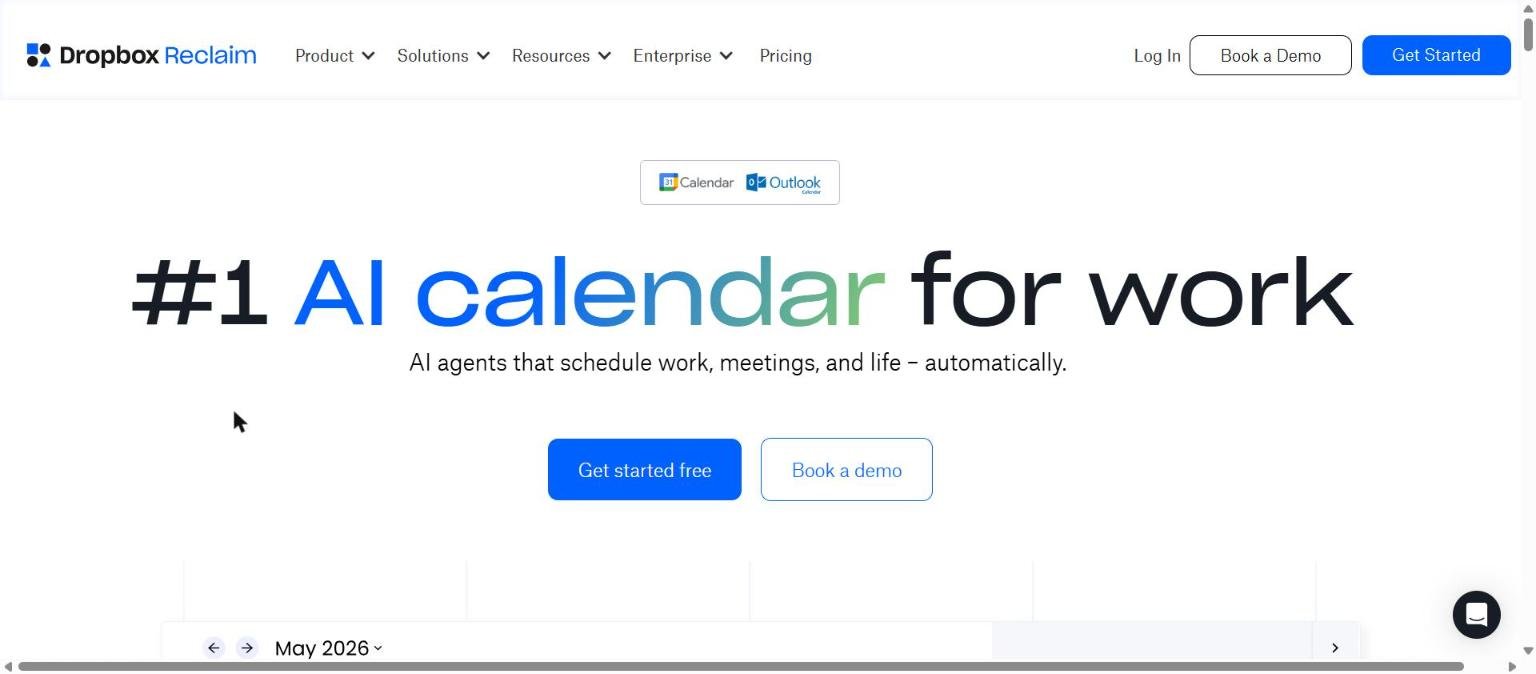
- Reclaim’s homepage headline is “#1 AI calendar for work”, and it works on top of Google Calendar and Outlook Calendar. The site header shows the Dropbox Reclaim name.
- Dropbox announced the acquisition of Reclaim on 20 August 2024, and the Reclaim post said it did not plan changes to pricing or support at that time.
- On the pricing page we read on 14 November 2026 there was a free Lite plan, then Starter at $10, Business at $15 and Enterprise at $22 per seat per month with the yearly option shown.
- The plans are differentiated by the number of AI agents, scheduling range, calendar syncs, integrations and admin features rather than by one overall feature switch.
- Reclaim lists SOC 2 Type II, SSO and SCIM, GDPR and DPF, and says there is no AI training on your data. Its performance statistics on the homepage are vendor figures.
What Reclaim is and who makes it
Reclaim is a scheduling product from Reclaim.ai, Inc., according to the copyright line on its site. The homepage headline reads “#1 AI calendar for work” with the sub-line “AI agents that schedule work, meetings, and life, automatically.” It lists Google Calendar and Outlook Calendar as the calendars it works with, and says it is free on both.
Reclaim is now part of Dropbox. The site header we captured on 14 November 2026 shows the name “Dropbox Reclaim”, and a Reclaim blog post dated 20 August 2024 announced that the Reclaim team was joining Dropbox. That post said Reclaim would keep investing in the product and that there were “no planned changes to pricing or customer support anytime soon.” It listed near-term plans, including Outlook support for all users, migrating users to a new Smart Meetings and Habits 2.0 platform, and work toward a Reclaim Assistant and smart scheduling for one-off meetings. That was the position in 2024, and we did not read a more recent statement on ownership or plans.
The homepage says Reclaim is trusted by more than 600,000 users across 70,000 companies. That is a vendor claim and we could not verify it.
Who Reclaim is for
- Individuals who want to protect focus time. The Lite plan is free and includes five AI agents covering focus time, habits, buffer time, smart meetings and meeting quality.
- Small and mid-sized teams. Starter is for up to 10 seats and Business for up to 100 seats, with shared policies, an out-of-office calendar and delegated access on Business.
- Executive assistants and admins. Delegated access (for assistants and admins) is listed on Business and Enterprise.
- Large organisations. Enterprise lists SSO and SCIM provisioning, org-chart aware scheduling intelligence, workforce analytics add-ons and unlimited AI agents per seat.
If you want one product that also manages projects, docs and meeting notes, look at Motion. If you want a scheduler that sits on your existing calendar, Reclaim fits that description more closely. Our tool choice guide explains how to decide.
Core features
AI Focus Time
The homepage says you set a weekly goal and Reclaim auto-defends time to get work done. The pricing table lists proactive and reactive focus time modes, auto-decline of meetings during focus time, team templates, company OKRs and enterprise reports, though the tier split for each is not clear from the text we extracted.
AI Habits
Habits are described as AI-powered recurring events that flex and find time. The pricing page lists habit templates, a lunch habit and habit time defence settings.
AI Tasks
Tasks are auto-synced and scheduled onto your calendar by priority. The pricing page lists task time-blocking, time tracking and timers, task recommendations from meetings, and integrations with Google Tasks, Todoist, Asana, ClickUp, Jira and Linear.
AI Scheduling Links
The homepage says these can replace Calendly and “share 524% more availability”, which is a vendor claim. The pricing table lists one scheduling link on Lite, three on Starter and unlimited on Business and Enterprise, plus features such as booking pages, embeds, round-robin links and branding settings.
AI Smart Meetings and Buffer Time
Smart Meetings let AI flexibly schedule and optimise internal meetings. Buffer Time adds time to break, prepare and follow up. The pricing page lists pre and post-meeting buffers, travel time buffers and airport travel time buffers among the buffer features.
Calendar sync and Slack status sync
AI Calendar Sync blocks your availability across calendars to eliminate conflicts, and Slack Status Sync updates your status from your calendar to reduce interruptions.
Planner, working hours and out-of-office
The pricing page lists a planner with universal priorities across calendar events, no-meeting days, daily digests with conflict recommendations and agendas, time blocking customisation and custom working hours settings. A team out-of-office calendar and delegated access are listed for Business and Enterprise. These are the controls that decide how aggressively the AI may move things, so they are worth reading before you switch on automation for a whole team.
Time tracking and reporting
Tasks time tracking, timers, weekly productivity reports and productivity statistics appear in the feature table. Reclaim also describes time intelligence on the homepage, from personal time tracking to workforce analytics, with a Deep Work Index and measures of meeting load and fragmentation. The pricing page lists workforce analytics, exports, a baseline organisation performance review and benchmarks as enterprise-level items.
Newer and advanced features and integrations
AI agents and the agent library
The homepage promotes agents that “work 24/7” and an agent library with examples such as preventing burnout, improving team meeting health, defending coding time, detecting meeting overload and defending a no-meeting day. The pricing page uses the number of AI agents per seat as a plan limit: 5 on Lite, 10 on Starter, 100 on Business and unlimited on Enterprise.
AI Assistant
Reclaim lists an AI assistant for chat that finds time to meet, resolves conflicts and analyses your day. The pricing page rates the assistant as limited on Lite, standard on Starter, expanded on Business and unlimited on Enterprise.
MCP and assistant integrations
The pricing page lists a ChatGPT integration, Claude and Claude Code MCP, and Microsoft Copilot MCP under extensions and platform. Some entries are annotated as read only on certain plans, and we could not tell from the text which tiers have write access. Check this if you plan to schedule through an assistant.
Meeting tools
The pricing page lists Zoom meetings and transcripts integration, Google Meet auto-add, Microsoft Teams support, a Raycast extension and a Google Calendar and Gmail add-on. It also lists AI meeting agenda creation, follow-up message generation and meeting transcript sync.
Analytics and initiatives
Reclaim offers weekly productivity reports, time tracking, team analytics and workforce analytics. The homepage describes company-wide initiatives, such as a focus time initiative or no-meeting day initiative, aimed at enterprise customers. The homepage reports statistics such as 7.6 hours more focus time per week and 2.3 fewer meetings per week, which are vendor figures with no methodology on the page.
Pricing and plans
Checked on 14 November 2026 on the Reclaim pricing page. The page has a toggle between “Yearly – SAVE 20%” and “Monthly”, and we read it with the yearly option shown, so the figures are the displayed per-seat-per-month prices on that option. We did not record the monthly equivalents. Prices change, so confirm on the vendor page before you buy.
| Plan | Audience | Price as shown | AI agents | Seats |
|---|---|---|---|---|
| Lite | Calendar basics | Free forever | 5 | 1 user team |
| Starter | Small teams | $10 per seat per month | 10 per seat | Up to 10 |
| Business | Large teams | $15 per seat per month | 100 per seat | Up to 100 |
| Enterprise | Enterprise support | $22 per seat per month, contact us | Unlimited per seat | Over 100 |
Limits that change by plan
| Limit | Lite | Starter | Business | Enterprise |
|---|---|---|---|---|
| Scheduling range | 1 week | 8 weeks | 12 weeks | 12 weeks |
| Calendar syncs | 1 | 3 | Unlimited | Unlimited |
| Scheduling links | 1 | 3 | Unlimited | Unlimited |
| Integrations | Limited | Unlimited | Unlimited plus webhooks | Unlimited plus webhooks |
| Support tier | Community | Basic | Priority | Dedicated |
The page also lists discounts: 50 percent off for 12 months for students, educators and faculty, 20 percent off for three years for qualified nonprofits and startups, and 20 percent off for six months when switching from Clockwise, Motion or Calendly. Add-ons include analytics-only seats and an enterprise pilot. For help reading plan tables, see our guide to AI pricing pages.
Strengths
A real free plan
Lite is described as free forever with no credit card required, and it includes five AI agents. That lets you test the approach on your own calendar before paying.
Works on the calendar you already use
Reclaim sits on top of Google Calendar and Outlook Calendar rather than replacing them, which keeps the migration cost low.
Clear plan structure
The pricing page has a long feature-by-plan table, so you can see what each tier includes and lacks.
Enterprise controls
SOC 2 Type II, SSO and SCIM, GDPR and DPF, live human support with a stated average response time of under 20 minutes, and a stated 99.9 percent uptime are listed on the homepage.
Visible analytics for teams
If you need evidence about meeting load or fragmented time, the team analytics and workforce analytics described on the pricing and home pages give managers a way to look at calendars in aggregate. Whether those measures are reliable enough for your decisions is something to test with your own data.
Several discounts
Student, nonprofit, startup and switching discounts reduce cost for some buyers.
Weaknesses and limits
Narrower than an all-in-one tool
Reclaim optimises calendars. It integrates with task tools like Asana, Jira and Todoist rather than replacing them, and the pages we read do not describe its own docs or full project management.
Plan limits can bite
One week of scheduling range, one calendar sync and one scheduling link on Lite are tight. The seat caps (up to 10 on Starter, up to 100 on Business) push growing teams upward, and the pricing table shows a maximum of 100 users across a domain on the lower plans.
Some integrations are partial on lower tiers
The extensions list shows read-only entries for assistants like ChatGPT and Claude on some plans. If agent write access matters to you, confirm exactly which tier you need.
Vendor statistics lack methodology
Numbers such as 7.6 hours more focus time and 49 percent less time waste, as well as the ROI calculator on the pricing page, are presented without a method, so treat them as marketing.
Ownership detail is a year or two old in our sources
The acquisition post is from August 2024 and the header now reads Dropbox Reclaim. We did not find a current roadmap, so check the vendor for plans that affect you.
Privacy, data handling and security
From the Reclaim homepage, read on 14 November 2026:
- SOC 2 Type II, described as the highest standards for security and compliance.
- SSO and SCIM provisioning through your identity provider.
- GDPR and DPF handling of personal data.
- 99.9 percent uptime with high availability and disaster recovery.
- A statement near the sign-up button that says “No AI training on your data”.
- A link to a trust centre, which we did not open.
A scheduling tool sees your meetings, attendees and titles, so review which calendars you connect and what the permissions are. The pricing page lists user and role management and security reviews as plan features. Our guide on protecting company data when using AI tools offers a checklist.
How Reclaim compares
| Point | Reclaim | Motion |
|---|---|---|
| Core idea | AI calendar for focus time, habits, meetings and scheduling links | AI planner for tasks, projects, calendar, docs and meetings |
| Free option | Lite, free forever | Free trial |
| Entry paid price shown | $10 per seat per month | $19 per seat per month (Teams, annual) |
| Project management | Integrates with task tools such as Asana, Jira and Linear | Built-in projects, timelines and Gantt charts |
| Stated security | SOC 2 Type II, SSO and SCIM, GDPR and DPF | SOC 2 Type 2, encryption in transit and at rest |
For more, see Motion vs Reclaim for scheduling and our profile of Motion. Use our side-by-side method to run your own test.
Getting started
- Sign up for the free Lite plan and connect Google Calendar or Outlook Calendar.
- Set a weekly focus time goal and one habit, such as lunch.
- Add buffers around meetings and watch how the calendar adjusts during the first week.
- Create a scheduling link and try it with a colleague.
- If you use a task app, connect it and check how tasks are placed on your calendar.
- Check which plan limits you hit, then decide on an upgrade. Our guide to testing an AI tool before you pay offers a structure.
Frequently asked questions
Is Reclaim free?
Yes, there is a Lite plan described as free forever, with five AI agents, a one-user team, one week of scheduling range, one calendar sync and one scheduling link.
How much does Reclaim cost?
On 14 November 2026 the pricing page showed Starter at $10, Business at $15 and Enterprise at $22 per seat per month with the yearly option selected. Confirm monthly pricing on the vendor page.
Does Reclaim work with Outlook?
The homepage and pricing table list Google Calendar and Outlook Calendar support, and the homepage says it is free on both.
Is Reclaim owned by Dropbox?
A Reclaim blog post dated 20 August 2024 announced that the team was joining Dropbox, and the site header now shows Dropbox Reclaim.
Does Reclaim train AI on my data?
The homepage says “No AI training on your data”. Read the privacy policy for the full terms.
Can Reclaim replace Calendly?
The homepage says its AI scheduling links can replace Calendly. The pricing page lists scheduling links on every plan, with different limits.
Does Reclaim offer discounts?
The pricing page lists student, nonprofit, startup and switching discounts. Check the eligibility terms.
Conclusion
Reclaim is a focused tool for people and teams who want AI to protect focus time and tidy a calendar they already use. The free plan, the plan table and the security statements are clear strengths, while its narrower scope, plan limits and unverifiable statistics are the main things to weigh. If you want projects and docs in the same app, compare it with Motion. Start with Lite, measure what changes, and use our tool choice guide to document your decision.
Sources
- Reclaim homepage, accessed 14 November 2026
- Reclaim pricing, accessed 14 November 2026
- Reclaim blog: Dropbox acquires Reclaim, dated 20 August 2024, accessed 14 November 2026
- Motion homepage, accessed 14 November 2026
- Motion pricing, accessed 14 November 2026


