
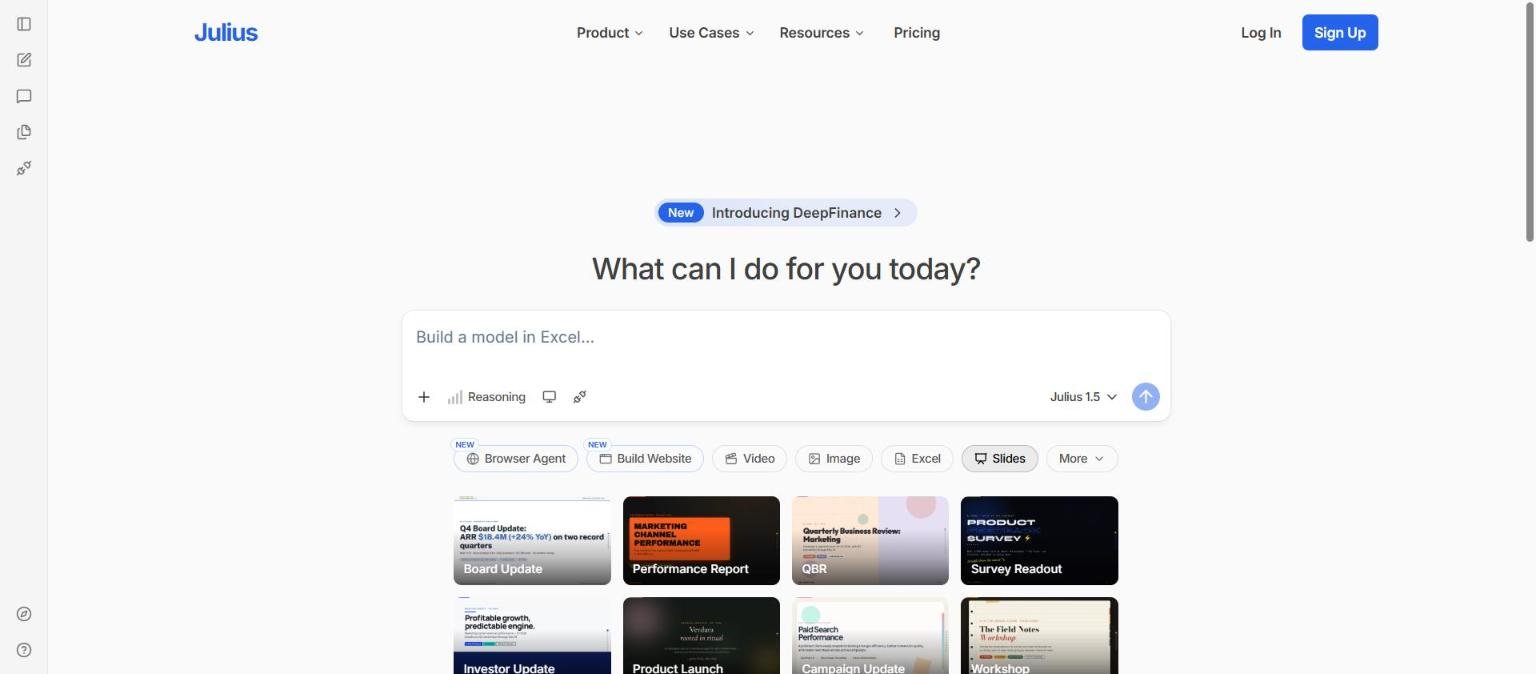
Julius AI started as a chat-based way to analyse spreadsheets and data files. Today its homepage presents something broader: a prompt box under the heading “What can I do for you today?”, with shortcuts for a browser agent, building a website, video, images, Excel and slides. Its pricing page calls it “Your AI Workspace” for analysis, research, presentations, reports, websites, images and video.
That shift matters if you read older reviews that describe Julius only as a data analysis tool. This guide is based on the vendor’s homepage and pricing page as we read them on 14 November 2026, and explains what the current product claims, how credits work, who it might suit and where you should ask more questions before paying.
How we researched this: we did not run hands-on tests for this article. It is based on the vendor’s own documentation and public sources, checked on 14 November 2026. Features and prices change, so confirm details on the vendor’s site before you buy.
Key takeaways
- Julius now describes itself as one AI workspace for analysing data, doing research, and creating presentations, reports, dashboards, websites, images and video.
- The pricing page listed Free, Plus ($20 per month), Pro ($45 per month), Business ($450 per month) and Enterprise (custom), all built around monthly credits.
- Paid plans mention frontier models, named on the page as GPT-6.1 Sol and Claude Opus 5.5, and 100 daily refresh credits.
- Database connectors such as Snowflake, BigQuery and Postgres appear in the paid tiers, and SOC 2 Type II compliance is listed on the pricing page.
- The page does not make clear whether the headline prices are monthly or annual, so confirm before buying.
What it is and who makes it
From data analysis to an AI workspace
Julius lets you describe what you want in plain language and works on files or connected data. The pricing page lists six jobs under “Every plan gives you one place to research, analyze, build, and create”: analyse data and research with citations, create presentations, generate reports and dashboards, build websites and web apps, generate professional images and create and edit video.
What the homepage shows
The homepage offers a prompt box with a model selector set to Julius 1.5, a Reasoning control and shortcut buttons for Browser Agent and Build Website (both marked new), Video, Image, Excel, Slides and More. Below that are template cards such as Board Update, Performance Report, QBR, Survey Readout, Investor Update, Product Launch, Campaign Update and Workshop. A banner announces “DeepFinance”, which we could not read about in detail, so we do not describe it.
Who makes it
The pages we read did not give company details in the text we captured. Check the about, terms and privacy pages for the operator.
Because the product has changed so much, our older comparison Julius versus Tableau for quick analysis covers a narrower use case than the product now claims.
Who it is for
Analysts and operators who live in spreadsheets
The homepage prompt example reads “Build a model in Excel…”, and Excel is one of the shortcut buttons. People who produce recurring reports from files may like describing the job in words rather than building every chart by hand.
Marketing, sales and strategy teams
The template names point at business updates: QBRs, board updates, campaign updates and investor updates. If your week involves turning data into decks, the combined analysis and slides workspace is the draw.
Small teams that want one subscription
The paid plans bundle credits across analysis, slides, websites, images and video, which may be simpler than several separate subscriptions. It also means one credit pool to watch.
Data teams with databases
Paid tiers list Postgres, BigQuery and Snowflake connectors, and Business adds no table limit in data connections. This is aimed at people whose data lives in a warehouse, not only in files.
Who should look elsewhere
If you need a mature self-service BI platform with governance across hundreds of users, or if you want a tool that only reads your own sources, a different category may fit. Our guide on using AI for spreadsheet formulas safely may be enough for lighter needs.
Core features
Data analysis on files and connected sources
You can analyse files and connected data and get charts and answers with citations, according to the pricing page. Free users can connect Google Drive, OneDrive and SharePoint, and paid tiers list database connectors on top.
Excel and models
Excel is a headline shortcut on the homepage, and the example prompt asks for an Excel model. We could not confirm the depth of formula or workbook support.
Presentations
The product can turn an idea, prompt or source material into a presentation. The pricing page lists an AI presentation maker as limited on Free and available on paid plans.
Reports and dashboards
The vendor says it builds clear, shareable reports and dashboards from your data and research.
Websites and web apps
Build Website is a new shortcut, and Plus and above can publish websites on a custom Julius domain, according to the pricing page.
Images and video
The vendor lists image generation and video creation and editing, described as generating video from text or images and refining it in the same workspace. These are limited on Free.
Browser and parallel agents
Plus lists browser and parallel agents for research, and Pro lists unlimited parallel agents. A browser agent can carry out tasks on web pages for you, which also raises questions about what it can access, covered under privacy below.
Citations on research answers
The pricing page says analysis and research tasks return answers with citations. As with any cited AI answer, the value comes from opening the source and confirming it says what the summary claims, not from the presence of a link.
Newer or advanced features and integrations
Frontier models
The pricing page says Plus and above give access to frontier AI models, naming GPT-6.1 Sol and Claude Opus 5.5, while Free uses Julius Lite models and Enterprise lists all models, including the most powerful. These model names are the vendor’s own and we did not verify them. For background on how these models work, read our explainer on large language models.
Compute and memory
Plus lists 16 GB of RAM and Pro 32 GB. That affects how large a file or analysis the sandbox can handle, though we could not find explicit file size limits.
Scheduled runs
The comparison table lists scheduled runs, with 3 on Free and unlimited shown for higher tiers. Because the table was captured as text, we could not map every column with certainty.
Teams and administration
Business lists team collaboration for up to 50 members. The comparison table lists shared workspace, shared files, shared threads, a usage dashboard, centralised billing and audit logs under teams, and SOC 2 Type II compliance, two-factor authentication, user roles and permissions and single sign-on under admin, controls and security.
Semantic schema learning
The table lists “Semantic Schema Learning” for database use, and an FAQ asks how Julius queries across thousands of tables. The answer was not in the text we captured, so we cannot describe it.
What each job needs
The table maps the jobs listed on the pricing page to what we could confirm about them.
| Job | What the pricing page says | Plan note |
|---|---|---|
| Analyse data and research | Explore files, run analyses, visualise results and get answers with citations | Available on every plan; Free uses Julius Lite models |
| Create presentations | Turn an idea, prompt or source material into a polished presentation | Limited on Free |
| Reports and dashboards | Build shareable reports and dashboards from data and research | Plan detail not captured |
| Websites and web apps | Create responsive websites and interactive tools | Limited on Free; Plus and above can publish on a Julius domain |
| Images | Generate original images for campaigns, products and presentations | Limited on Free |
| Video | Generate video from text or images and refine it in the same workspace | Limited on Free |
What each job needs
The table maps the jobs listed on the pricing page to what we could confirm about them.
| Job | What the pricing page says | Plan note |
|---|---|---|
| Analyse data and research | Explore files, run analyses, visualise results and get answers with citations | Available on every plan; Free uses Julius Lite models |
| Create presentations | Turn an idea, prompt or source material into a polished presentation | Limited on Free |
| Reports and dashboards | Build shareable reports and dashboards from data and research | Plan detail not captured |
| Websites and web apps | Create responsive websites and interactive tools | Limited on Free; Plus and above can publish on a Julius domain |
| Images | Generate original images for campaigns, products and presentations | Limited on Free |
| Video | Generate video from text or images and refine it in the same workspace | Limited on Free |
Pricing and plans
Checked on 14 November 2026. The page has a billing toggle with a “SAVE 20%” label for annual billing, and the text we captured did not state which setting the displayed prices reflect. Confirm on the live pricing page.
| Plan | Price shown | Credits and key limits |
|---|---|---|
| Free | $0 per month | Free daily credits; Julius Lite models; limited slides, image, video and website tools; Google Drive, OneDrive and SharePoint connectors; 3 scheduled runs; 7-day file storage |
| Plus | $20 per month | 2,000 credits monthly and 100 daily refresh credits; frontier models; 16 GB RAM; 7-day file storage; publish websites on a Julius domain; browser and parallel agents |
| Pro | $45 per month | 5,000 credits monthly and 100 daily refresh credits; 32 GB RAM; unlimited parallel agents; priority email support |
| Business | $450 per month | 60,000 credits monthly; invite teammates; up to 50 team members; Postgres, BigQuery, Snowflake and more connectors; no table limit in data connections |
| Enterprise | Contact sales | Unlimited credits; all models; permanent file storage; custom connectors; tailored onboarding |
Credits are the real currency. Because one credit pool covers analysis, slides, images and video, the plan that suits you depends on how heavy your image and video use is. The page does not say how many credits a typical analysis or a slide deck consumes, which is the first thing to ask. Our guide on how to read an AI tool pricing page covers credit-based plans.
Strengths
One place for analysis and output
Going from a data file to a chart to a slide deck in one workspace removes copy and paste between tools.
Connectors for real data
Google Drive, OneDrive and SharePoint on Free, and databases on paid tiers, mean it can work on data where it lives.
Clear plan ladder
Free, Plus, Pro, Business and Enterprise differ in credits, memory, agents and team features, which makes the ladder easy to read.
Security and admin features listed
The pricing page lists SOC 2 Type II compliance, two-factor authentication, roles and permissions, single sign-on and audit logs, which is more than many small AI tools state.
Templates for common business outputs
Board updates, QBRs and survey readouts give non-experts a starting point for recurring documents.
Room to grow from solo use to a team
The ladder from Free through Pro to Business, with seats for up to 50 members, lets a solo user start small and add colleagues without switching products.
Weaknesses and limits
Broad scope means thin detail
The product now spans analysis, slides, websites, images and video. A broad tool can be good at connecting tasks but may not match specialist products in each area, and the pages give little depth on any one.
Credit consumption is unclear
The pricing page states monthly credits but not what typical tasks cost. Heavy video or image use may use a plan up quickly.
Prices may be monthly or annual
The toggle labelled “SAVE 20%” suggests annual billing is cheaper, but we could not tell which prices are displayed.
Model names are vendor-reported
GPT-6.1 Sol and Claude Opus 5.5 are named on the page. Which model handles which task, and whether it changes, is not explained.
Output still needs checking
AI-produced analysis can contain wrong numbers or misread columns. Our guide to checking AI output for mistakes is worth following for any figure you will present.
Free tier is a sampler
Several tools are marked limited on Free, and file storage is 7 days on Free, Plus and Pro. If your work needs files to persist for months, check the storage terms, since permanent file storage is listed only for the top tier in the comparison table we read, and we could not map that column with certainty.
A fast-moving product
The homepage carries new items marked New, including a browser agent, a website builder and DeepFinance. A product that changes this quickly can mean features appear and move between plans, so a review written today can age within weeks. Re-check the plan page before each renewal.
Privacy, data handling and security
The pricing page lists SOC 2 Type II compliance and, in its admin and security block, two-factor authentication, user roles and permissions and single sign-on. An FAQ entry titled “How does Julius handle security and compliance?” appears without its answer in the text we captured, so we cannot report what it says about encryption, retention or model training.
- Ask whether your files or database queries are used to train any model.
- Ask how long uploaded files are retained. the comparison table lists 7-day file storage on the lower tiers and permanent file storage on the top tier.
- Review what the browser agent can access before using it with logged-in accounts.
- Test with non-sensitive data first.
See our guide to protecting company data when using AI tools for a fuller checklist.
How it compares
Julius overlaps with several tools, but none is a like-for-like match. The table uses only points documented on pages we read on 14 November 2026.
| Tool | What it centres on | Overlap with Julius |
|---|---|---|
| Julius AI | Data analysis plus slides, sites, images and video | Credit-based workspace with data connectors |
| NotebookLM (now Gemini Notebook) | Answers from your own sources | Google says every notebook gets a secure cloud computer that can write and run code for data analysis on your sources; rollout began with AI Ultra and select Workspace users |
| Gamma | Presentations, documents and websites | Both make presentations and websites; Gamma is credit-based with Free, Plus, Pro and Ultra plans |
| Elicit | Extraction from academic papers | Both can produce tables of extracted data, but Elicit is built for scientific literature |
If your main need is a data-focused analysis tool, read Julius versus Tableau for how it compares with a traditional BI product.
Getting started
- Sign up for the free plan and connect one low-risk file or a sample spreadsheet.
- Ask a question you already know the answer to and compare Julius’s result with your own calculation.
- Try one slide deck from a template to see how many credits it uses.
- Check the usage display after each task so you can estimate monthly cost.
- Only then decide between Plus and Pro, and check whether the displayed price is monthly or annual.
Our guide to testing an AI tool before you pay has a longer checklist.
A practical first test is to take a spreadsheet you built yourself, ask Julius to reproduce three numbers you already know, and then ask for one chart and one slide. If the numbers match and the credit use looks sensible, widen the test to a connected data source.
Frequently asked questions
Is Julius AI free?
Yes, there is a Free plan with free daily credits, Julius Lite models and limited use of slides, image, video and website tools.
How much does Julius cost?
On 14 November 2026 the page showed Plus at $20 per month, Pro at $45 per month and Business at $450 per month, with Enterprise on request. It did not state whether those figures are monthly or annual billing.
What can Julius do besides data analysis?
The pricing page lists presentations, reports and dashboards, websites and web apps, images, and video creation and editing.
Which models does Julius use?
The page names GPT-6.1 Sol and Claude Opus 5.5 for paid plans and Julius Lite models for Free. These are the vendor’s statements.
Does Julius connect to databases?
The comparison table lists Snowflake, BigQuery and Postgres connectors for paid tiers, plus Google Drive, OneDrive and SharePoint on all plans.
Is Julius secure?
The pricing page lists SOC 2 Type II compliance, two-factor authentication, roles and single sign-on, but we could not read the FAQ answer on security. Check the details yourself.
Is Julius the same product as it was a year ago?
Not necessarily. Older reviews describe a data analysis chatbot, while the current site presents a wider AI workspace, so check recent information.
How do I compare Julius with a business intelligence tool?
Start from the job. If you need quick, ad hoc questions on files, a chat-based tool may be faster. If you need governed dashboards for many users, a BI platform is built for that. Our Julius versus Tableau article walks through the trade-offs.
Conclusion
Julius is no longer only a data analysis chatbot. Its documented strengths are a single credit-based workspace, connectors to files and databases, and visible security and admin features. Its documented unknowns are what tasks cost in credits, which model does what, and whether the headline prices are monthly or annual.
Best for: people who turn data into reports and slides regularly and want one tool. Think twice if: you need deep specialist features in slides, video or BI. Start on the free plan, verify numbers independently and read the live pricing before upgrading.
Sources
- Julius AI homepage, accessed 14 November 2026
- Julius AI pricing page, accessed 14 November 2026


