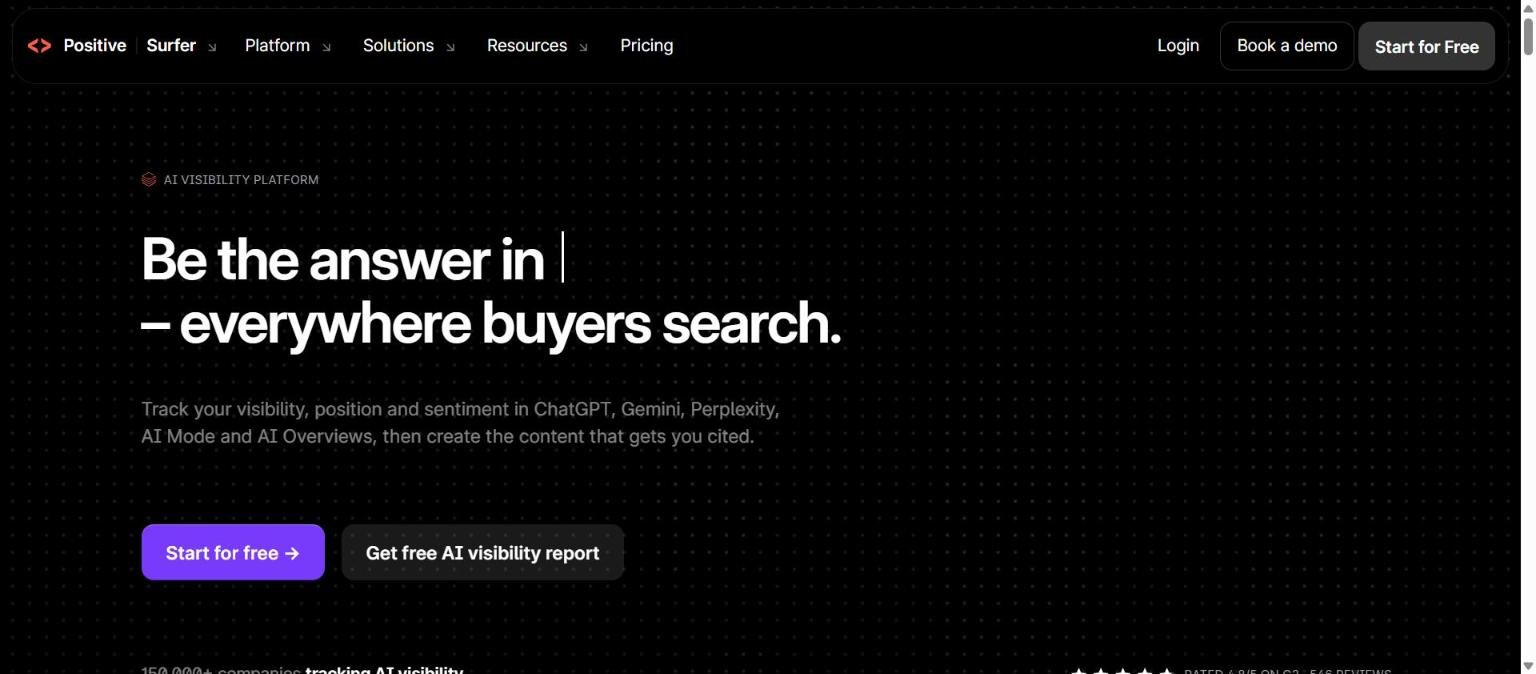
Surfer, which this site and many readers still know as Surfer SEO, now presents itself as an AI visibility platform. Its homepage headline reads “Be the answer in Google, everywhere buyers search,” and the product pitch centres on tracking how a brand shows up in ChatGPT, Gemini, Perplexity, Google AI Mode and AI Overviews, alongside the content tools it was originally known for.
This guide covers what the vendor documents about features, plans and limits, and flags what we could not confirm. The domain is now surfer.ai, and surferseo.com redirects there, so older reviews may describe a different positioning. For a shorter take see our shorter review, and for a framework across content tools see Surfer, Frase and Clearscope: what to compare.
How we researched this: we did not run hands-on tests for this article. It is based on the vendor’s own documentation and public sources, checked on 14 November 2026. Features and prices change, so confirm details on the vendor’s site before you buy.
Key takeaways
- The vendor now describes Surfer as an AI visibility platform, and says it tracks visibility, position and sentiment in ChatGPT, Gemini, Perplexity, AI Mode and AI Overviews. The homepage claims 150,000 plus companies track AI visibility with it (a vendor figure).
- The pricing page, read on 14 November 2026, lists six plans from $49 per month (Discovery) to $299 (Peace of Mind), all shown as billed yearly, plus a custom Enterprise plan.
- Plans differ on documents per month, prompts tracked, pages tracked, brand spaces, MCP and API access, and support level.
- The content tools the product was known for, including Content Editor, Content Audit and Topical Map, are still listed in the product navigation.
- We did not run hands-on tests and did not read a security page, so we cannot confirm data handling details. Check the vendor’s pages before you buy.
What Surfer is and who makes it
Surfer is the product at surfer.ai, which we visited on 14 November 2026 after surferseo.com redirected there. The homepage calls the product an AI visibility platform and says it tracks visibility, position and sentiment across ChatGPT, Gemini, Perplexity, AI Mode and AI Overviews. It claims that more than 150,000 companies track AI visibility with it. That is the vendor’s own figure and we have not verified it.
The page header shows a name pair that reads “Positive | Surfer” with a product switcher. We could not confirm what “Positive” refers to, whether it is a sister product, a parent brand or a separate offering, so we do not describe it. We also did not find a company history page, so we do not state who owns Surfer or where the company is based.
A change from the older framing
Earlier descriptions of the product, including ours, focused on on-page content optimisation for search. The current homepage leads with AI visibility instead, and the navigation lists the content tools as part of a wider set. If you read an older review, treat its feature and plan details as out of date until you confirm them on the current site.
Who Surfer is for
The vendor does not publish a single audience statement in the text we read, so this section reflects what the plans suggest. Entry plans emphasise document allowances, which points to writers and small content teams. Mid tiers add prompt tracking and brand spaces, which suggests marketers who need to watch how a brand appears in AI answers. The highest listed plan includes unlimited documents and a dedicated success manager, and the custom Enterprise plan lists SSO, security and white-label options, which suggests agencies and larger organisations.
| Reader | What the pricing page suggests |
|---|---|
| Solo writer or small site | Discovery lists 120 documents and 10 tracked pages, with no prompt tracking |
| Marketer who wants AI visibility data | AI Search Analytics lists 50 prompts daily and 5 brand spaces |
| Content team with volume | Standard and Pro list 360 documents |
| Agency or larger team | Peace of Mind lists 100 prompts daily, API and a dedicated success manager; Enterprise adds SSO and white-label |
If you are still deciding whether a tool like this belongs in your stack, how to choose an AI tool gives a short method.
Core features
AI Tracker
The AI Tracker is the headline feature. The homepage says it tracks visibility, position and sentiment in AI answers. The pricing page expresses allowances as prompts tracked daily or weekly and as brand spaces. A prompt in this context is a question the tool asks an AI assistant on your behalf, and tracking means checking how your brand appears in the answer over time. We did not read documentation that explains the method in detail.
Content Editor
Content Editor is listed in the product navigation. Pricing is expressed in documents per month, with 120 on Discovery and 360 on Standard and Pro. The page does not define what counts as a document in the text we read, so check before you plan around the number.
Content Audit
Content Audit is listed as a separate tool, and Discovery mentions 10 pages tracked. The pricing text we read does not explain how pages tracked relate to Content Audit, so we do not claim a link.
Topical Map
Topical Map is listed in the navigation. We did not read a description of how it is generated or what it outputs.
Search Console report and free tools
The site lists a Search Console report, a free AI visibility audit and a volatility tracker. Free tools are a way to see what the vendor does without paying, though we did not use them and cannot describe their output.
AI detector and humanizer
An AI detector and humanizer are listed. Be cautious with any claim that a tool can reliably detect or hide AI writing, and see how to spot AI generated text and images for the limits of such methods.
Newer and advanced features and integrations
Surfy assistant
The navigation lists Surfy, described as an assistant. We did not read documentation for it.
MCP and API
MCP access is listed on the AI Search Analytics plan, and API access is listed on Peace of Mind. The text we read does not give request limits, so we cannot say how much data you can pull.
Chrome extension
A Chrome extension is listed among the products. The vendor page does not explain what it does in the text we read.
Integrations
WordPress, Google Docs, Contentful and Zapier appear on the pricing page as integrations on higher tiers. We could not confirm exactly which tier includes each one, so confirm before relying on a specific integration.
Pricing and plans
Checked on 14 November 2026 on the official pricing page. Every price on the page was shown as per month and billed yearly. We did not see a monthly billing price in the text we read, so we cannot say what month-to-month would cost. Prices and limits change, so confirm on the vendor page, and see how to read an AI tool’s pricing page.
| Plan | Price per month, billed yearly | Notable inclusions listed |
|---|---|---|
| Discovery | $49 | 120 documents, 10 pages tracked, no prompt tracking |
| AI Search Analytics | $82 | 50 prompts daily, 5 brand spaces, MCP |
| Standard | $99 | 25 prompts weekly, 360 documents |
| Pro | $182 | 50 prompts daily, 360 documents, 5 brand spaces |
| Peace of Mind | $299 | 100 prompts daily, unlimited documents and brand spaces (marked with an asterisk on the page), API, dedicated success manager |
| Enterprise | Custom | SSO and security, white-label |
Reading the table
The plan names do not map neatly onto a ladder. AI Search Analytics at $82 lists more prompts per day than Standard at $99, while Standard lists more documents. That suggests different plans suit different jobs, tracking versus writing, rather than a simple small, medium and large. The asterisk on “unlimited” on Peace of Mind means a fair use or similar condition may apply, and we could not confirm the wording.
Support
Support is listed as customer support with a 24 hour response target on weekdays. Higher plans list more direct help, including the dedicated success manager on Peace of Mind.
Strengths
Clear focus on AI answer tracking
The product is built around a question many marketers now ask, which is whether their brand is mentioned when a buyer asks an AI assistant. The homepage names five surfaces it tracks, which is specific.
Content tools in the same account
The navigation keeps Content Editor, Content Audit and Topical Map in the same product family as the tracker, so a team can look at writing and visibility together without a second vendor.
Plans split by job
Because plans emphasise either documents or prompts, a team can choose what it needs. A writer who does not need tracking can look at Discovery, and a marketer who wants tracking can look at AI Search Analytics.
Free tools to look first
A free AI visibility audit and a volatility tracker are listed, which lets you form a view before paying.
API and MCP are on the menu
MCP and API access are available on named plans, which helps if you want to feed results into other tools.
Weaknesses and limits
Positioning has shifted
If you came for classic on-page optimisation, the homepage now leads with AI visibility. The content tools are still listed, but you should confirm that the editor you want is available on the plan you choose.
Plan structure is hard to compare
Mixed units, documents, prompts, pages and brand spaces, make a like for like comparison difficult. You need to map your own volume against each plan before deciding.
Yearly billing view only
All prices we read were annual billing figures. We could not confirm a month to month price or a refund policy.
Some terms are unclear
The unlimited asterisk, the meaning of a document and the “Positive” brand label were not explained in the text we read.
Measurement of AI answers is inherently variable
AI assistants can give different answers to the same question at different times. The homepage itself offers a volatility tracker, which hints at this. Treat visibility numbers as indicators and read our note on AI hallucinations for related cautions.
Privacy, data handling and security
The only security statement we read was that the Enterprise plan lists SSO and security. We did not read a security page, a privacy policy or a trust centre, so we cannot tell you about certifications, data retention, or whether your content is used for model training. If you plan to upload unpublished drafts or connect Search Console, ask the vendor in writing first, and use our guide to protecting company data as a checklist.
How it compares with alternatives
The table uses only what each vendor’s own pages said on 14 November 2026. We read Semrush and Ahrefs pages for this batch. We did not read a Frase page when writing this section, so Frase is not in the table.
| Area | Surfer | Semrush | Ahrefs |
|---|---|---|---|
| Positioning | AI visibility platform with content tools | SEO and AI visibility toolkits, “An Adobe Company” | “Discoverable in search, AI, and beyond” |
| Entry paid plan shown | Discovery $49 per month, billed yearly | SEO Classic Pro $117.33 per month on the annual option | Lite $129 per month (billing view not confirmed) |
| Prompt tracking | From AI Search Analytics, 50 prompts daily | Semrush One Starter lists 50 AI prompts daily | Lite lists 150 checks per month |
| Backlink and keyword suites | Not described in the text we read | Backlinks, keyword research, Position Tracking | Site Explorer, Keywords Explorer, Rank Tracker |
| Content editing | Content Editor, Audit, Topical Map | Content optimization on higher tiers | Content Kit add-on from $99 per month |
The broad suites cover link and keyword research that Surfer’s pages do not describe, while Surfer’s pages lean harder on content workflow. For the decision framework see Semrush versus Ahrefs and Surfer versus Frase versus Clearscope, and read our Semrush guide and Ahrefs guide for the details.
Questions to ask before you buy
Because several terms on the pricing page were not defined in the text we read, send these questions to the vendor or check its help centre first.
What exactly counts as a document?
Plans are measured in documents per month. Find out whether editing an existing page, auditing a page or generating an outline each consume one document, and whether unused documents roll over.
How are prompts chosen and run?
Prompt tracking is the core of the AI visibility offer. Ask who writes the prompts, whether you can supply your own, which country and language each one runs in, and how often each assistant is queried. A plan that says 50 prompts daily is only useful if those prompts reflect real buyer questions.
What does a brand space contain?
Several plans list brand spaces. Ask whether a brand space equals one domain, one product line or one client, because that decides whether an agency can serve several customers on one plan.
What happens to the unlimited label?
Peace of Mind shows unlimited documents and brand spaces with an asterisk. Ask for the fair use wording in writing.
Can I pay monthly, and can I get a refund?
We only saw yearly billing figures. Ask what a month to month price is, if one exists, and what the refund terms are for annual plans.
Where is my data stored and is it used for training?
We could not confirm this from the pages we read. If you will connect Google Search Console or upload unpublished drafts, get the answer in writing before you start.
Getting started
- Decide whether your priority is writing optimised content, tracking AI visibility, or both.
- Open surfer.ai and try the free AI visibility audit if you want a first look without paying.
- Read the pricing page and note that figures are per month billed yearly.
- Map your volume, documents per month, prompts and brand spaces, to the plan table.
- Check which integrations you need, such as WordPress or Google Docs, and confirm which tier includes them.
- Run a small trial using how to test an AI tool before you pay for it before committing for a year.
Frequently asked questions
Is Surfer the same as Surfer SEO?
The domain surferseo.com redirected to surfer.ai when we checked, and the header shows the name Surfer. We read that as the same product under a shorter name, but we did not find an official rename announcement.
How much does Surfer cost?
On 14 November 2026 the pricing page listed plans from $49 per month (Discovery) to $299 per month (Peace of Mind), all billed yearly, plus custom Enterprise pricing. We could not confirm monthly billing prices.
Which AI assistants does it track?
The homepage names ChatGPT, Gemini, Perplexity, Google AI Mode and Google AI Overviews.
Does it have an API?
The pricing page lists API access on Peace of Mind, and MCP access on AI Search Analytics. We did not read request limits.
Does it integrate with WordPress or Google Docs?
Both are named on the pricing page among integrations, along with Contentful and Zapier. We could not confirm which tier includes each one.
Is there a free option?
The site lists a free AI visibility audit and a volatility tracker. We did not see a free plan in the pricing table.
What support do I get?
Customer support is listed with a 24 hour target on weekdays, and Peace of Mind adds a dedicated success manager.
Conclusion
Surfer has moved from a content optimisation tool toward an AI visibility platform, and its current pages reflect that. The documented strengths are a clear tracking focus, content tools in the same family and plans split by job. The documented limits are mixed units across plans, annual billing figures only and several terms we could not confirm. We have not tested the product, so judge its data on your own queries.
For the older, shorter view see our shorter review, and for a method to weigh it against others use how to compare AI tools side by side fairly.
Sources
- Surfer homepage (surferseo.com redirects here), accessed 14 November 2026
- Surfer pricing section, reached from the homepage navigation, accessed 14 November 2026